OCR for Invoice Processing: From Photo to Booked Entry
Invoices arrive in every possible shape: a crumpled receipt photographed on a phone, a tidy PDF from a supplier's billing system, a structured UBL e-invoice from a government portal. The naive approach is to throw all of them at OCR and hope. The better approach is to recognise what kind of document you have first, and only reach for the expensive tools when you actually need them.
Not every document needs OCR
There's a hierarchy of effort, and using the cheapest step that works keeps things fast, accurate, and auditable:
- Structured UBL e-invoices are already machine-readable XML. Parse them directly — no OCR, no AI, no guessing. The vendor, line items, and VAT are fields, not pixels.
- Born-digital PDFs carry a real text layer. Read it straight from the file. The characters are exact; there's nothing to "recognise."
- Scans and photos are the only documents that truly need OCR, followed by a language model to turn messy extracted text into clean, structured fields.
Routing this way means the majority of documents skip the error-prone path entirely — and the ones that don't get the full treatment.
Where the LLM earns its keep
OCR gives you characters; it doesn't give you meaning. "€ 121,00" on a page could be the subtotal, the VAT, or the total. A language model is what maps raw text onto the fields you actually care about — vendor, invoice date, amount excluding VAT, VAT rate, amount including VAT — and reconciles them so the numbers add up.
For the Dutch market that means encoding BTW logic directly: the 21%, 9%, and 0% rates, and the relationship between amounts excluding and including VAT. When the extracted figures don't reconcile, that's a signal to lower the confidence score and ask a human to look.
Trust comes from review, not magic
No matter how good extraction gets, nothing should be booked silently. The pattern that works:
- Show the original document next to the extracted fields, side by side.
- Attach a confidence score per invoice so low-certainty ones stand out.
- Keep a full audit trail — the original file, the raw extraction, and every correction a human made.
That combination is what makes automation trustworthy: it's fast when it's confident and honest when it isn't.
Seeing it in practice
This is exactly the pipeline behind Facturis, an AI bookkeeping assistant for Dutch freelancers and firms — smart routing per document, built-in BTW logic, and a review step before anything is booked. It runs either as a hosted cloud service or entirely inside your own infrastructure for teams with strict data-privacy requirements.
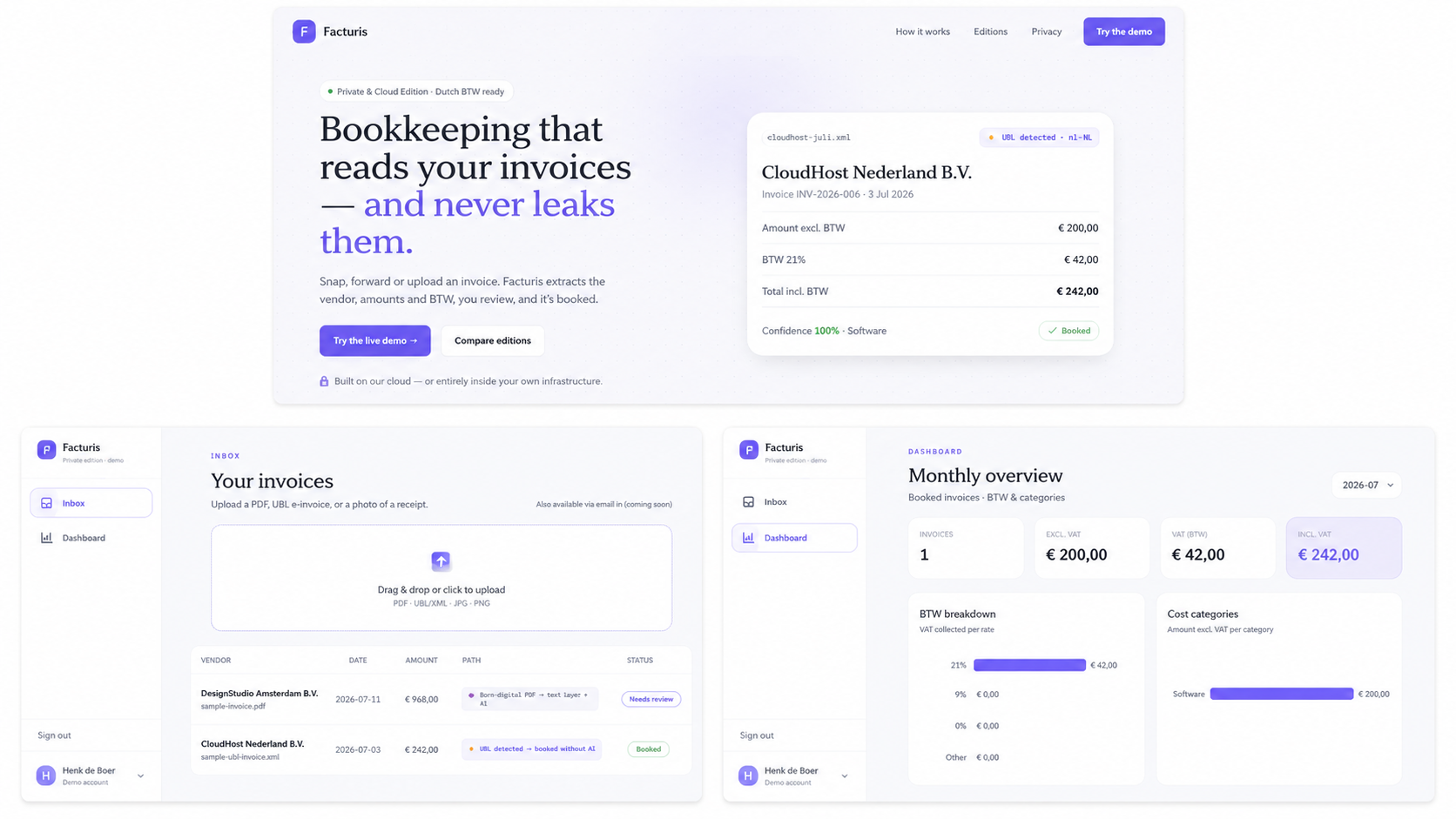
The routing shows up directly in the invoice list. One document is tagged Born-digital PDF → text layer + AI; the other reads UBL detected → booked without AI and went straight through — no OCR, no model call, nothing to second-guess. The first is still marked Needs review, the second is already Booked. The dashboard then rolls the booked entries up per BTW rate, which is where the 21 / 9 / 0% logic stops being an implementation detail and starts being the thing you actually file.
Curious whether this fits your workflow? Get in touch.